AI Tools · 2026 Guide
Multimodal AI Note-Taking: How to Capture Lectures, Meetings, and PDFs in One Workflow
Multimodal AI note-taking unifies lectures, meetings, PDFs, and supporting media into one searchable workspace. Compare HyNote, NotebookLM, Otter, Fireflies, and Notion AI — and learn how to build a cross-format workflow that actually compounds.
Multimodal AI note-taking unifies lectures, meetings, PDFs, and supporting media into one searchable workspace. Compare HyNote, NotebookLM, Otter, Fireflies, and Notion AI in this 2026 guide.
What Is Multimodal AI Note-Taking?
Multimodal AI note-taking is the process of capturing information across the formats many students and knowledge workers use every week — lectures, meetings, PDFs, audio recordings, images, web pages, and videos — then turning those inputs into one searchable, organized knowledge system. Unlike text-only note apps, meeting transcription tools like Otter and Fireflies that focus mainly on calls, or research notebooks like NotebookLM that work best with uploaded documents, multimodal AI note-taking tools are built for workflows that move between audio and documents throughout the day.
The term refers to a specific category of AI tool, not just any note app with an AI feature. A traditional note app stores text. A meeting transcription tool converts one audio stream into a transcript. A research notebook works inside a fixed source set. A multimodal AI note-taking tool does something different: it ingests several format types — most commonly recorded audio, document files, and live capture — and unifies them into a single organized layer of notes, summaries, and structured outputs. A multimodal AI note-taking tool should also let you chat with all your sources at once — asking questions across recordings, PDFs, and notes in one place, instead of opening each file separately.
HyNote is one example of a tool built for this cross-format workflow, with common use cases around lectures, meetings, and PDFs. This guide explains what multimodal AI note-taking is, why it matters in 2026, how it differs from adjacent categories, and how to choose the right tool for different note-taking workflows.
Why Lectures, Meetings, and PDFs Create a Scattered Notes Problem
Most knowledge work in 2026 is not single-format. A typical week for a graduate student or a working professional contains a mix of synchronous and asynchronous information: recorded meetings, live lectures, PDF research papers, webinar replays, voice memos, web articles, and handouts. The problem is not that any one of these is hard to capture. The problem is that each one lives in a different tool, and the notes a person actually needs sit across all of them.
Consider a typical Tuesday for a knowledge worker — for example, a consultant. She joins a client meeting at 10:00 — the recording and transcript live in Zoom or Otter. At noon she reviews a 40-page market research PDF in Google Drive. At 3:00 she sits in on an internal webinar — that recording lives in a separate platform. By Friday, when she needs to write a memo synthesizing the week, she has to remember which insight came from which tool, manually search three different places, and stitch the pieces together herself. The AI summary tools she uses for each input do not talk to each other.
This is the scattered notes problem. It is not solved by a better transcription tool, because the bottleneck is not transcription. It is not solved by a better document reader, because the bottleneck is not reading. It is solved by a workflow that treats audio and documents as the same kind of input — sources to be captured, summarized, searched, and connected. That is the workflow a multimodal AI note-taking tool is designed for.
For students, the same pattern shows up differently: lectures during the day, assigned readings in PDF at night, study notes from the textbook, and revision sessions that need to draw from all three. The categories of input change — meetings become lectures, market reports become academic papers — but the structural problem is identical. The information is multimodal. The tools are not.
Multimodal AI Note-Taking vs. Meeting Transcription vs. Document Research
Not all AI note tools solve the same workflow. Most fall into one of four categories, each with a different strength and a different limitation.
| Category | Example tools | Best for | Key limitation |
|---|---|---|---|
| Meeting transcription | Otter, Fireflies, Fathom | Calls, live meetings, transcripts, action items | Usually meeting-first or audio-first; not primarily designed as PDF readers or document research workspaces |
| Source-based research | NotebookLM | PDFs, documents, research materials, Google ecosystem sources | Less focused on live capture or audio-first inputs |
| Workspace AI | Notion AI | Internal notes, docs, projects, team knowledge | Best when content already lives inside the workspace; may require an extra step to bring external material in |
| Multimodal AI note-taking | HyNote | Lectures, meetings, PDFs, and supporting audio/video/web materials | Newer category; users may need to build a cross-format workflow intentionally |
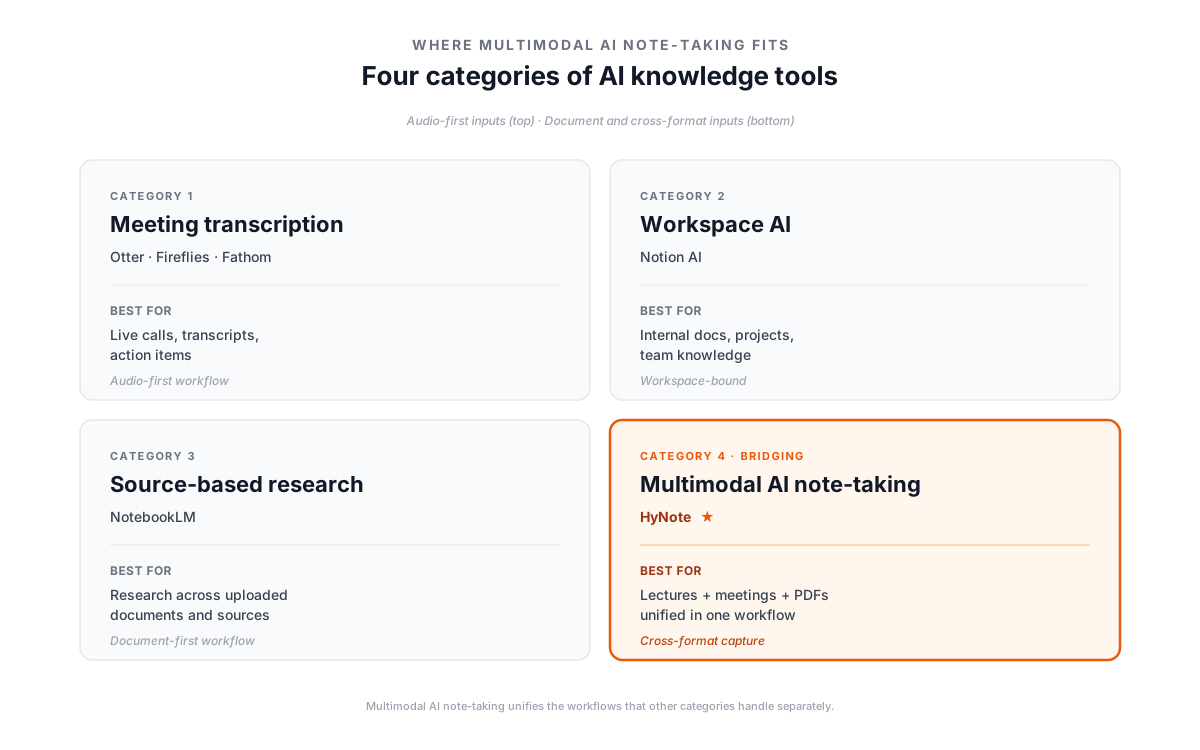
The distinction matters because most users default to picking one tool from one category and then live with the workflow gap that creates. A consultant who picks Otter handles meetings well but still has a separate process for PDFs. A researcher who picks NotebookLM handles uploaded documents well but cannot easily capture a live lecture in the same workflow. A team that picks Notion AI gets workspace search but may need extra steps to bring audio captured outside Notion into that workspace.
Multimodal AI note-taking is the category designed to bridge these. It does not replace specialized meeting transcription tools when transcription accuracy is the only thing that matters, and it does not replace source-grounded research notebooks when working inside a fixed document set. What it does is reduce the number of tools a single person uses to organize knowledge from two or three down to one — which is the actual workflow most students and knowledge workers need.
The Core Inputs a Multimodal AI Note Tool Should Handle
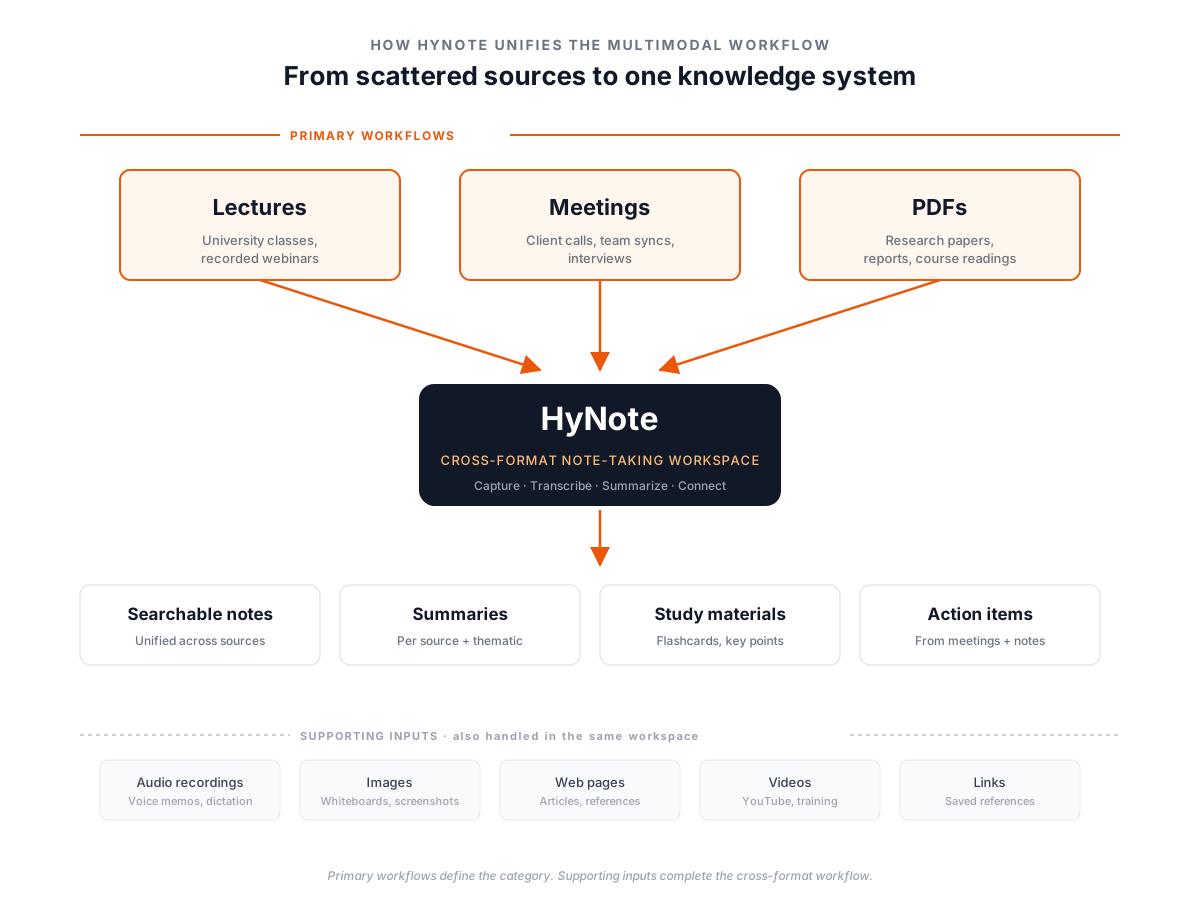
A useful working definition: a multimodal AI note-taking tool is one that handles the three most common knowledge inputs reliably, with three or four supporting inputs that round out a real workflow.
The three core inputs:
Lectures. Live or recorded educational content — university classes, online courses, recorded webinars, conference talks. A multimodal AI note tool should transcribe the audio, identify segments, and produce study-ready outputs like summaries, key points, and revision materials. Lectures are unique because they combine sustained audio with slide-based visual context, and the tool needs to track both.
Meetings. One-on-one and group calls, live or recorded, internal or with clients. A multimodal AI note tool should produce transcripts with speaker identification, generate summaries, and surface action items. Meetings differ from lectures in conversational structure: more speakers, more interruption, more reliance on accurate attribution.
PDFs. Research papers, market reports, books, course readings, internal documents. A multimodal AI note tool should extract text reliably, preserve document structure (headings, tables, figures), and let the user ask questions across the full document. PDFs are still one of the most common places where research, course readings, reports, and study materials live, and a tool that cannot handle them well is not a serious cross-format option.
Supporting inputs that complete the workflow:
- Audio recordings outside of structured meetings or lectures — voice memos, field recordings, dictated notes.
- Images — whiteboards, screenshots, slide photos, handwritten notes.
- Web pages and links — articles, references, online resources that need to be saved with the rest of the workflow.
- Videos — YouTube lectures, recorded webinars, training content where transcription plus context matters.
In practice, a multimodal AI note-taking tool turns recordings, PDFs, and YouTube videos into the same kind of output — searchable notes, summaries, and action items — regardless of which format the source came in.
A tool that handles the three core inputs (lectures, meetings, PDFs) and at least two of the supporting inputs is, in practical terms, a multimodal AI note-taking tool. HyNote, for example, fits this pattern: its common use cases center on lectures, meetings, and PDFs, with supporting formats available in the same workspace. Tools that handle only one of the three core inputs — like pure meeting transcription apps — are not multimodal in this sense, regardless of how many minor formats they technically support.
Best Multimodal-Capable AI Note Tools Compared (2026)
Five tools cover most of the workflows that fit — or partially fit — the multimodal AI note-taking category. They are listed below in order of how close they sit to the category center: HyNote is purpose-built for cross-format capture; the others occupy adjacent categories that some users may choose if their workflow leans heavily toward one input type.
HyNote— Built for Cross-Format Note-Taking
HyNote is built around the three core inputs that define multimodal AI note-taking: lectures, meetings, and PDFs. Its workflow is designed for users who move between recorded audio and document-based materials in the same week — students attending lectures and reading assigned PDFs, consultants joining client calls and reviewing research reports, researchers transcribing interviews and annotating papers.
HyNote supports additional inputs (audio recordings, images, web pages, video) in the same workspace, with notes, summaries, and study-ready outputs generated from supported source types. Free plan available; Pro starts at $6.66/mo annual ($11.99 monthly) and expands transcription minutes, storage, and advanced AI features. Available on web, mobile, and tablet.
NotebookLM— Best for Source-Grounded Research
NotebookLM is Google's AI research notebook. Users upload or connect sources — PDFs, websites, YouTube videos, audio files, Google Docs, and Google Slides — and the tool answers questions, generates summaries, and produces outputs that aim to stay grounded in the user-provided source set as much as possible.
Its strongest use case is source-based research: when a user has a fixed set of documents and wants an AI assistant designed to keep its answers tied to those specific sources. NotebookLM is less suited to live or daily capture; it expects the user to bring sources to it deliberately, not to run continuously in the background while a user attends meetings or lectures. It offers a free tier and a NotebookLM Pro paid plan. Best for researchers, analysts, and students working with stable document sets, especially inside Google's ecosystem.
Otter— Well-Known AI Tool for Meeting Transcription and Notes
Otter is a well-known AI tool for meeting transcription and meeting notes. Its strengths are live transcription, speaker identification, and meeting-specific outputs like AI summaries and meeting workflows. Otter joins calls on Zoom, Google Meet, and Microsoft Teams, captures audio in real time, and produces a transcript users can search and edit afterwards.
Otter offers a free Basic plan with monthly transcription limits, plus paid Pro, Business, and Enterprise plans that expand transcription minutes, audio/video imports, advanced AI workflows, and integrations with tools like Salesforce, HubSpot, and Zapier. Otter explicitly markets to education use cases like lecture transcripts in addition to business meetings, but its core workflow centers on audio: it is not primarily designed as a PDF reader, image note tool, or document research workspace. Available on web, iOS, Android, Mac, Windows, and Chrome extension.
Fireflies— Built for Team and Sales Meeting Workflows
Fireflies covers similar audio-first ground to Otter but is oriented toward team and business workflows: CRM integrations, AI summaries shared into Slack, searchable team meeting libraries, and AI automation for sales follow-up. Its free tier includes unlimited transcription with unlimited AI summaries and 400 minutes of storage per team; Pro $10/seat/mo annual ($18 monthly) adds 8,000 minutes of storage per seat; Business $19/seat/mo annual ($29 monthly) adds unlimited storage and video recording.
Fireflies integrates with Zoom, Google Meet, Microsoft Teams, and other video conferencing tools, with mobile apps for iOS and Android, a Chrome extension, and a desktop app. Like Otter, it is meeting-first by design; it is not primarily a PDF or document research tool. Best for sales teams, customer success teams, and internal teams that need meeting notes to connect with business workflows beyond the call itself.
Notion AI— Built into the Notion Workspace
Notion AI works inside Notion. If a team already runs its docs, projects, and internal knowledge in Notion, Notion AI provides chat, doc generation, AI Meeting Notes, and Enterprise Search layered directly on top of that workspace. As of July 2026, full Notion AI features are included with the Notion Business plan at $20/user/mo annual ($24 monthly) and Enterprise plan, with Free and Plus tiers receiving a limited trial of AI features.
Some advanced AI features, including AI Meeting Notes, depend on plan eligibility and current Notion AI packaging, so users should verify the current Notion pricing and AI feature pages before choosing it for meeting capture. The strength of Notion AI is workspace integration: it is most useful when the content a user wants to work with already lives in Notion or in connected tools like Slack, GitHub, and Microsoft Teams. For users whose notes, recordings, PDFs, and lectures live across many external tools, Notion AI may require an extra step to bring that material into the workspace first. Available on web, Mac, Windows, iOS, and Android, with offline support on desktop and mobile.
Choose the Right Tool If...
The simplest way to navigate the comparison is by the workflow a user actually has, not the feature list a tool advertises.
Choose HyNote if your knowledge work moves between lectures, meetings, and PDFs in the same week — students attending classes and reading assigned papers, consultants joining client calls and reviewing reports, researchers transcribing interviews and annotating articles. Multimodal capture in one workspace is the core use case.
Choose NotebookLM if your workflow is research-first and source-grounded — a fixed set of documents you want to analyze deeply, especially if those sources already live in Google Drive, Google Docs, or YouTube.
Choose Otter if your information primarily comes from live meetings or recorded lectures and you need strong meeting-focused transcription with AI summaries. Otter is meeting-first and audio-first by design.
Choose Fireflies if you run team or sales meetings and need notes to flow into business workflows — CRM updates, team libraries, automated follow-ups.
Choose Notion AI if your team's knowledge already lives in Notion and you want AI features where you already work, not a separate cross-format capture tool. Available on the Notion Business and Enterprise plans.
Choose a combination if no single tool covers your full workflow. A common pattern: a meeting transcription tool for live calls plus a research notebook for document analysis. The trade-off is two tools, two libraries, and a manual stitching step at the end of the week. This is the trade-off multimodal AI note-taking is designed to eliminate.
How to Build a Cross-Format Note-Taking Workflow
A multimodal AI note-taking workflow is not built tool-first. It is built input-first. The right tool follows from the inputs a person actually captures, not the other way around. A three-step process works for most users.
Step 1: Audit your information inputs for one typical week
Track every source you take in: meetings attended, lectures or webinars consumed, PDFs read, articles bookmarked, voice notes recorded, images captured. The goal is not precision — it is to see the distribution. Most users find their inputs cluster around three formats, not eight. For students, the cluster is usually lectures + textbooks/PDFs + study notes. For professionals, it is usually meetings + reports/PDFs + miscellaneous reading. Knowing your top three is what determines tool fit.
Step 2: Pick a tool that handles your top three inputs natively
"Natively" means built into the core workflow, not added as a workaround. A meeting transcription tool handles meetings natively but is not primarily built for PDFs, even if it technically allows file uploads. A research notebook handles documents natively but is not primarily designed for live lecture capture. A multimodal AI note-taking tool is one that treats all three of your top inputs as primary use cases, not afterthoughts. If no single tool covers all three, pick the one covering the two highest-volume inputs and accept a secondary tool for the third.
Step 3: Build a weekly review ritual
AI captures sources. Review converts them into knowledge. Block thirty minutes weekly to scan the past week's notes, surface key themes, and link related sources across formats. The output should be a short synthesis — a few paragraphs or bullets — that captures what the week's lectures, meetings, and reading actually added up to. Without this step, multimodal capture becomes a more efficient form of hoarding. With it, the workflow produces genuine compounding knowledge.
FAQ
Multimodal AI note-taking is the process of capturing information across multiple formats — most commonly lectures, meetings, and PDFs, with supporting inputs like audio recordings, images, web pages, and videos — and unifying them in one searchable, AI-organized note workspace. It is distinct from meeting transcription tools (which focus on calls), source-grounded research notebooks (which focus on uploaded documents), and workspace AI (which focuses on team docs).
For students who both record lectures and read research PDFs, a multimodal AI note-taking tool like HyNote fits best, because it captures lectures, assigned readings, and study notes in one workspace rather than splitting them across separate apps. HyNote is one strong option for students because it supports the three input types students most often combine in a single week: lectures, PDFs of assigned readings, and study notes. NotebookLM is also useful for students whose work is heavily document-based — for example, literature reviews or research projects with a fixed reading list. Otter explicitly serves education use cases and works well when a student's workflow is dominated by recorded lectures rather than mixed inputs.
HyNote is built for cross-format capture across lectures, meetings, and PDFs, with live recording as a primary use case. NotebookLM is built around source-grounded research within a set of uploaded documents, with Google ecosystem integration as a strength and an emphasis on keeping AI answers tied to the user-provided sources. HyNote suits users whose knowledge inputs include live audio (lectures, meetings) alongside documents. NotebookLM suits users whose workflow centers on analyzing documents the user uploads deliberately.
Otter and Fireflies are meeting-first transcription tools. They handle live calls and recorded audio well — Otter explicitly markets to lecture-recording use cases — but they are not primarily designed as PDF readers or document analysis tools. A user with substantial PDF reading or lecture-plus-reading workflows will typically need a second tool to handle documents, which is the workflow gap multimodal AI note-taking tools are designed to close.
Security varies by tool and plan. Users handling confidential meeting recordings, sensitive PDFs, or proprietary lecture content should check each tool's data handling policy: where audio and documents are stored, whether content is used to train AI models, and what enterprise-grade encryption and compliance options exist. Free tiers often have different data policies than paid plans. Enterprise plans from tools like Otter, Fireflies, and Notion offer additional controls such as SSO, HIPAA compliance, and custom data retention. Reading the privacy documentation before uploading sensitive content is recommended for any AI note-taking workflow.
Many AI note-taking tools offer web and mobile access, but input support can differ by platform. Users should check whether their most important inputs — such as live audio recording, PDF upload, or lecture capture — are fully supported on mobile before choosing a tool. Otter, Fireflies, and Notion AI offer iOS and Android apps in addition to web access; HyNote is available on web, mobile, and tablet; NotebookLM is primarily web-based as of 2026.
Ready to Build Your Cross-Format Workflow?
Stop juggling separate tools for meetings, lectures, and PDFs. HyNote brings audio and document capture into one workspace — with AI-powered summaries, search across all your sources, and chat with any note or recording.
Free to start. No credit card required.
Get the HyNote
Never take notes again. Build your AI-powered second brain with HyNote.

Loved by 1M+ users