Mac comparison · Checked 15 October 2026
How to choose the best AI note taker for Mac
Compare six Mac apps on four questions: how they record, where transcription runs, where AI runs, and where the note is saved. The six are Apple Notes, HyNote, MacWhisper, Granola, Talat, and Google AI Edge Foresight.
Short answer
- Apple Notes: best for a voice recording that should live inside a note.

- HyNote: best for bot-free meetings that need system audio and the microphone, saved On This Mac or in HyNote Cloud.
- MacWhisper: best for private, on-device transcripts of audio files.
- Granola: best for bot-free meeting notes when cloud transcription is acceptable.
- Talat: best for on-device meeting notes on an Apple silicon Mac or a Windows PC.
- Google AI Edge Foresight: best for trying Google's experimental on-device meeting companion.
HyNote publishes this page. Competitor details are summarized from each vendor's linked public pages. This is not an accuracy test on shared audio.
Short comparison
Read each column on its own. A tool can record on the Mac and still send audio away for transcription. A tool can also transcribe on the Mac and still sync the note.
| Tool | Best for | Record on this Mac | Transcribe on this Mac | AI on this Mac | Save on this Mac |
|---|---|---|---|---|---|
| Apple Notes | A recording that should live in Notes | Microphone, inside the note | On device, M1 or later | No meeting-notes workflow in Apple's guide | In the note; iCloud can sync |
| HyNote | Bot-free meetings, saved on the Mac or in the cloud | Microphone and system audio, no bot | On device or online, your choice | On device with Apple Intelligence, or online | On This Mac or HyNote Cloud |
| MacWhisper | Private transcripts of audio files | Microphone; import a file | On device by default | Optional local or cloud | On the Mac unless cloud is on |
| Granola | Bot-free notes with cloud transcription | Microphone and system audio, no bot | Cloud transcription provider | Cloud | Cloud notes, local cache; audio not kept |
| Talat | On-device meetings on Mac or Windows | On device, both sides of a call | On device | On device by default | Local database |
| Google AI Edge Foresight | Experimental on-device meeting notes | System audio and microphone | On device | On device | On the Mac |
Scroll sideways on a small screen. Versions, prices, devices, and source links are in Who each tool fits.
Record, transcribe, AI, and save are four separate questions
Record on this Mac means the app captures microphone audio, system audio, or both on the computer. It does not mean a bot joins the call, and it does not mean the transcript is created on the Mac.
Transcribe on this Mac means speech-to-text runs on that computer. HyNote lets you pick on-device or online transcription. On-device transcription uses the speech models macOS provides, so many Macs already have what they need; the first use of a language may download its model.
AI on this Mac means summaries, chat, or rewriting run on the computer. HyNote's on-device AI uses Apple Intelligence, which needs Apple silicon, macOS 26.4 or later, and Apple Intelligence turned on. Other Macs, including Intel Macs, use online AI. MacWhisper, Talat, and Foresight document their own on-device paths. Granola produces notes in its cloud.
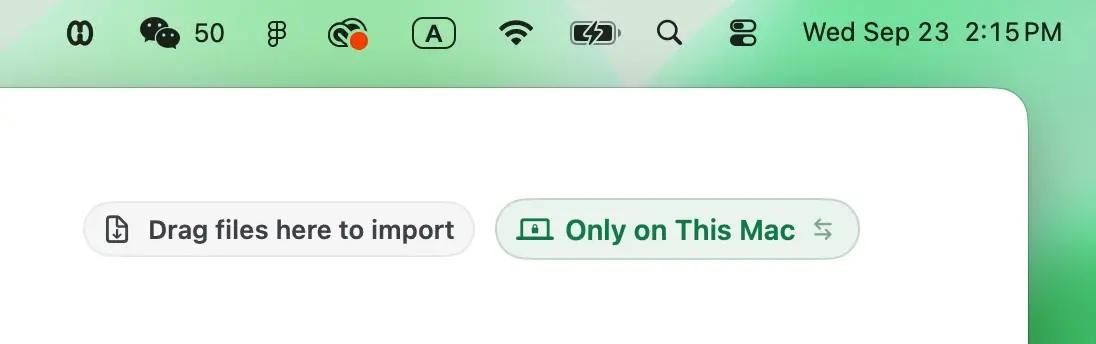
Save on this Mac means the note or the audio has a home on the computer. A local cache plus a cloud copy is a different answer from a local database. HyNote asks for this choice directly: On This Mac, or HyNote Cloud.
Recording without a bot
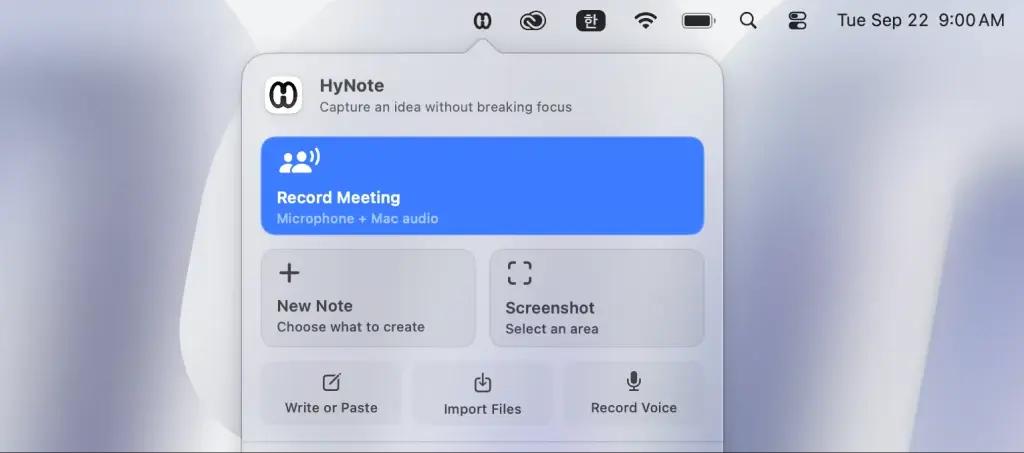
HyNote starts recording from the Mac menu bar. Meeting recording captures system audio and the microphone, so both sides of a call are recorded without a HyNote participant in Zoom, Meet, or Teams. Voice recording uses the microphone only and will usually miss the other people on the call.
Granola, Talat, and Foresight also describe capture on the computer rather than a bot in the meeting. Granola then passes microphone and system audio to a transcription provider. Talat says both sides of a call are transcribed on the device. Google says Foresight uses system audio and the microphone and can work offline. Apple Notes records inside the note. MacWhisper's site lists microphone recording and local transcription of files.
Saving on this Mac is not processing on this Mac
In HyNote, On This Mac keeps the original audio and the note in the current account directory on that Mac. That setting controls storage only: transcription and AI each have their own on-device or online choice. Sign-in, model downloads, and sync still use a connection.
Granola caches notes locally and stores them on US-hosted AWS. Its desktop apps do not keep the meeting audio after transcription. Talat says recordings, transcripts, and notes stay in a local database. Google says Foresight keeps sensitive meeting data on the device. An Apple Note holds the recording in the note, and an iCloud note can sync.
Who each tool fits
Each card lists supported computers, price, the public version, and the pages used. Prices change, so open the linked page before you buy or install.
Apple Notes
Use Apple Notes when the recording belongs next to the rest of the note and the Mac meets Apple's transcription requirements. Apple's guide describes recording from inside a note. It does not describe capturing the system audio of a Zoom, Meet, or Teams call.
- Devices
- Any Mac can open Notes. Apple's guide says transcription needs a Mac with M1 or later and a supported device language, and describes the features for iCloud notes.
- Price
- Included with macOS.
- Version
- Ships with macOS; no separate Notes version.
HyNote
Use HyNote when a meeting needs both sides of the call: system audio and the microphone, with no bot in the participant list. Storage, transcription, and AI are three separate settings, so you can keep a meeting On This Mac and still pick on-device or online processing.
- Devices
- macOS 14 or later on Intel and Apple silicon. On-device transcription uses macOS speech models and depends on the Mac and language. On-device AI needs Apple silicon, macOS 26.4 or later, and Apple Intelligence turned on, so Intel Macs use online AI.
- Price
- Recording and on-device transcription on supported Macs are part of the free core workflow. Online AI and plan limits are on the pricing page.
- Version
- HyNote for Mac 0.1.21, as published on the Mac download page.
MacWhisper
Use MacWhisper when the job is a private transcript of a file, with local speech models as the default and cloud transcription only if you turn it on. The official site also lists microphone recording and optional local models through Ollama and LM Studio.
- Devices
- macwhisper.com lists Apple silicon and Intel. Its help center says Intel Macs transcribe more slowly on device and points those users toward an optional cloud provider. Larger local models need more memory.
- Price
- On 15 October 2026, macwhisper.com listed a free tier and MacWhisper Pro as a one-time €64 license. Confirm the current price there before buying.
- Version
- Not published on macwhisper.com or its docs.
Granola
Use Granola when the priority is notes from a live meeting without a bot in the participant list, and cloud transcription is acceptable. Granola says it captures microphone and system audio on the computer, sends that audio to a transcription provider, and does not keep the desktop audio after transcription.
- Devices
- Granola's help center says meeting capture needs the desktop app on macOS or Windows, or the iPhone or Android app. The web app views and edits notes and does not capture meetings.
- Price
- Granola sells paid plans. Its help pages do not state a price; check granola.ai for the current plan.
- Version
- Not published in Granola's help center.
Talat
Use Talat when transcription, the default summary, and the meeting database should stay on the computer, including on Windows. Talat says a cloud model is optional and uses your own API key. That choice sends the transcript to the provider you pick.
- Devices
- talat.app/help says macOS 15 or later on Apple silicon, or Windows 10 or later. Intel Macs are not supported. The Mac app uses the Neural Engine.
- Price
- Talat's FAQ lists 10 hours free, then $9 a month, $89 a year, or $189 once. No account is required to start. Confirm the current price on talat.app.
- Version
- Not published. talat.app/help was last updated on 10 April 2026.
Google AI Edge Foresight
Use Foresight when you want Google's experimental meeting companion and the announcement's on-device terms match the meeting. Google says it uses system audio and the microphone, works with meeting apps without a bot, and keeps sensitive data on the device.
- Devices
- Google's 6 October 2026 announcement describes a Mac app with fully local processing. TechCrunch's 8 October 2026 report says Google's FAQ calls it optimized for Apple silicon and able to work offline. Confirm the current Mac requirement on Google's download page.
- Price
- Google's announcement describes on-device use with no cloud subscription. Treat the app as experimental and read the current download terms before installing.
- Version
- Experimental; announced 6 October 2026 without a build number.
FAQ
It can be, on a supported Mac. Choose On This Mac for storage, on-device transcription, and on-device AI. On-device AI needs Apple silicon, macOS 26.4 or later, and Apple Intelligence turned on. Sign-in, the first download of a language model, and sync still use a connection.
On This Mac stores the original audio and the note in the current account directory on that Mac. It controls storage only. Transcription and AI each have their own on-device or online setting. HyNote Cloud cannot restore a deleted local note, so export or back up important local meetings.
Yes, on Macs with M1 or later and a supported device language. Apple's guide describes recording inside an iCloud note. It does not describe capturing system audio from a call, so the other side of a Zoom or Teams meeting may be missed.
None. All six tools capture audio on the computer instead of sending a bot into the call. Bot-free does not tell you where transcription runs: Granola, for example, captures audio locally and sends it to a cloud transcription provider.
MacWhisper's site says local models are the default and that audio for that path stays on the Mac. Cloud transcription is an optional add-on. Check macwhisper.com before installing, and install only from the Gumroad link or the Mac App Store named on that site.
Granola's help center says the macOS and Windows apps transcribe in real time and do not store meeting audio. Notes and transcripts are stored on US-hosted AWS and cached on the device so they can be opened offline.
HyNote and MacWhisper. HyNote runs on Intel Macs with macOS 14 or later, but on-device AI needs Apple silicon, so Intel Macs use online AI. MacWhisper says on-device transcription is slower on Intel. Apple Notes transcription, Talat, and Foresight point to Apple silicon.
On-device transcription uses the speech models macOS provides, so the list depends on the Mac and macOS version. The first use of a language may download its model. The current list is on HyNote's Mac languages and availability page.
Record your next meeting with HyNote for Mac
Capture both sides of a call without a bot, choose on-device or online transcription, and keep the note On This Mac or in HyNote Cloud. HyNote for Mac runs on macOS 14 or later, on Intel and Apple silicon, and the core recording workflow is free.
Checked 15 October 2026. Product pages change. If a linked page disagrees with a cell in the table, the linked page is the one to follow, and this comparison should be updated.